

Web and browser agents can return a convincing final response after clicking the wrong element, repeating an action, stopping before completing the task, or extracting information that never appeared on the page. A text-only evaluation may approve the response while missing the browser behavior that caused the failure.
Reliable evaluation must examine the end state, the sequence of observations, and actions that produced the response. The required trace evidence varies by architecture, but it should support scores for task completion, action correctness, trajectory efficiency, extraction accuracy, and stalled or repeated execution.
This guide explains how to trace and score web-agent runs, reproduce production failures, and add verified failures to regression datasets. Braintrust connects development and production evaluations so teams can compare changes, enforce release requirements, and measure the same quality criteria after deployment.
What is web and browser agent evaluation?
Web agent evaluation measures whether an AI agent completes a browser task and follows an acceptable path to the required end state. The agent may interpret screenshots, DOM snapshots, accessibility trees, or a combination of page representations before clicking elements, entering text, selecting options, navigating between pages, or extracting information.
The terms web agent and browser agent are often used interchangeably. A web agent describes the system performing the task, while a browser agent emphasizes the browser environment in which the interaction occurs.
Web agent evaluation uses the same task, trial, and scoring structure as any agent evaluation, with page state added to the evidence. What changes is the surface the agent acts on. A general tool-using agent picks from developer-defined APIs with fixed schemas, while a web agent has to find its target in the site's markup, which the site owner can rewrite between runs. Because that markup can shift without warning, page interpretation and element grounding become part of the score. The same logic applies to other surfaces, so voice agent evaluation scores audio quality and turn-taking alongside task completion.
The same evaluation principles apply across common implementations:
- Browser Use: An agent framework that handles the browser interaction loop and can run against local or hosted browsers.
- Browserbase: Hosted browser sessions that agents can access over CDP, with live inspection and session recordings.
- Custom Playwright or CDP stack: An implementation in which the team owns the observation, decision, and browser-action loop.
The implementation determines which page evidence is available and where tracing should be added, but every setup must evaluate the agent's actions, the complete trajectory, and the resulting page state.
Web agent evals vs. standard LLM evals
Standard response-level LLM evals usually score a generated answer against a reference answer or rubric. Web agent evals must also examine browser interactions because every page observation and action affects the state available at the next step.
| Dimension | Standard LLM eval | Web agent eval |
|---|---|---|
| Input | Prompt, supplied context, and any reference answer | Task plus page observations captured throughout the run |
| Output graded | Model response | Browser actions, resulting page state, and final response |
| Environment | Usually a controlled evaluation context | A pinned test environment or live website that may change |
| What a passing score indicates | The response met the defined criteria | The recorded actions and end state met the defined criteria |
| Main blind spot | Actions or state changes outside the response | Browser events or page state omitted from the trace |
Because live websites can change independently of the agent, the same prompt and model may encounter different layouts, copy, A/B tests, or target elements across runs. Research on live web-agent benchmarks found that Mind2Web-Live's node-based evaluation remains vulnerable to website changes over time. A failed run may therefore indicate an agent regression, a website change, or an outdated success condition.
A convincing final response can also conceal an incorrect browser interaction. An agent might identify the correct checkout action, click a different element, and still claim that the task was completed. The web-agent benchmark study excluded final responses from its WebJudge evaluator, in part because hallucinated completion claims could distort the results.
Task length adds another source of difficulty because each navigation and action creates an opportunity for the agent to diverge from a successful path. The study grouped tasks by the number of human actions required and reported an average success-rate decrease of 31.6% from easy to medium tasks, followed by a further 15.4% decrease from medium to hard tasks. Evaluating intermediate actions reveals where a multi-step run began to fail.
Web agent failure modes and the scores that detect them
Each common failure mode leaves a different trace signal. Separating those signals helps determine whether the agent misread the task, selected the wrong page element, encountered an environment change, or stopped before reaching the required outcome.
| Failure mode | Signal in the trace | Score |
|---|---|---|
| Wrong-element click | The action is appropriate, but the selected target or resulting state is wrong | Step-level action correctness |
| Stale selector or target | The action cannot resolve an element after the page changes | Step-level action correctness and task completion |
| Loop or timeout | Actions repeat, pages alternate, or the run exceeds its budget | Loop and timeout detection, plus trajectory efficiency |
| Partial completion | The required end state is absent | Task completion |
| Wrong extraction | The returned value disagrees with the captured page or ground truth | Extraction accuracy |
Step-level action correctness
An agent can understand the task and still click the wrong element when a page contains repeated button labels, an overlay intercepts the click, or the target is hidden inside a shadow DOM. When browser actions are represented as tool calls, score the action type, target, entered value, and post-action state separately. A wrong action type indicates a planning error, while a correct action type applied to the wrong element indicates a grounding error.
Selector-based agents also need a separate signal for environment changes. A fixed CSS selector or XPath may stop resolving after the site owner changes the markup. Role, label, and visible-text locators reduce dependence on the page's exact structure, although they cannot prevent every target mismatch.
Braintrust's web agent cookbook demonstrates code-based scorers for action type and the values used in typing or selection steps.
Task completion
Verify task completion through evidence the agent does not generate, such as the final URL, a confirmation number displayed on the page, or a row written to a test database. The score should fail when an agent fills a form without submitting it or adds an item to the cart without completing checkout, regardless of what the closing response claims.
Trajectory efficiency
A trajectory scorer counts the steps the agent used and checks whether it revisited pages without making progress. Several routes may complete the same task correctly, so the scorer should allow an acceptable step range and multiple valid paths. A sustained increase in steps can indicate redundant navigation, unclear instructions, or rising execution costs.
Loop and timeout detection
Loop failures usually appear as repetition, oscillation, or dead waiting, in which the agent repeats an unacknowledged action, cycles between two pages, or waits for an element that never renders. Step ceilings, repeated-action counts, and wall-clock budgets should be recorded as evaluation scores alongside browser and network errors. Keeping the signals separate prevents a failed request or unavailable site from being mislabeled as an agent loop.
Extraction accuracy
Extraction scoring should compare the returned value with available ground truth and confirm that the value appears in the screenshot, DOM snapshot, or accessibility tree available to the agent. Page grounding can reject fabricated prices, dates, or stock levels when no reference answer exists, although confirming that a value appeared on the page does not prove that the agent mapped it to the correct field.
How to trace a web agent run
A web-agent trace must capture enough evidence to reconstruct what the agent observed, which action it selected, and how the browser state changed after execution. Without step-level evidence, a failed score identifies the affected run but cannot show whether the failure came from page interpretation, action selection, or browser execution.
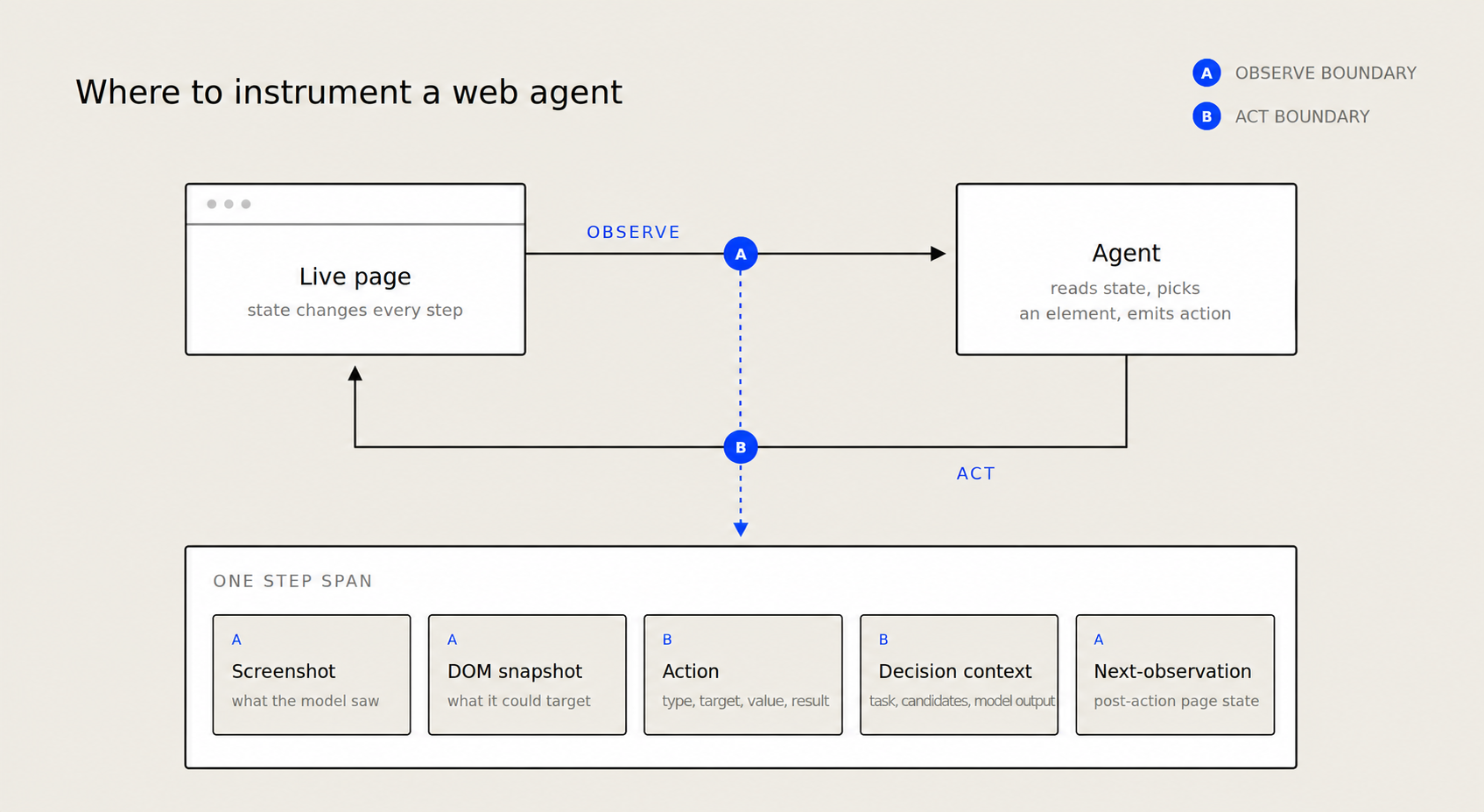
The observation boundary captures the page representation available to the agent. The action boundary records the selected action and its execution result, while the resulting page state becomes the next observation.
Capture step-level evidence
The required page evidence depends on the agent architecture. A visual agent needs the screenshot shown to the model, while a DOM-based or accessibility-based agent needs the corresponding DOM snapshot or accessibility tree. Each step should also record the emitted action, including its type, target, and value, along with the task, available actions, candidate elements, and model output used to make the selection. Private chain-of-thought is not required; log a structured rationale only when the application or model provides one.
After the browser executes the action, capture the resulting page state and any returned error. Comparing the pre-action and post-action states reveals silent no-ops, unexpected redirects, unresolved elements, and actions that changed the wrong part of the page.
Braintrust can store screenshots as attachments, allowing reviewers to inspect the image alongside the corresponding span and score. Its web agent cookbook creates a screenshot attachment as follows:
# Create attachment
result = Attachment(
    data=image_data,
    filename="screenshot.png",
    content_type="image/png",
)
Structure multi-step traces
Create one root span for the complete task and one child span for each agent step. Operations such as screenshot processing, page parsing, model inference, and browser execution can use nested spans within the relevant step. The resulting hierarchy connects each action with the page evidence and model call that produced it, while also separating model latency from browser or parsing delays.
The Braintrust cookbook follows this structure with separate spans for screenshot processing, HTML parsing, and model prediction. Without parent-child relationships, reviewers receive a flat list of calls and cannot reliably determine which page state or agent step produced a failed action. Braintrust's guide to examining traces explains how to inspect root spans and individual steps.
Instrument Browser Use, Browserbase, and custom browser stacks
Instrumentation belongs at the boundary where the agent receives page state and the boundary where the browser executes the selected action. The implementation determines where those boundaries can be wrapped:
- Custom Playwright or CDP stack: Wrap the functions that capture screenshots or structured page state and the functions that execute clicks, keystrokes, selections, and navigation.
- Browser Use: Use the on_step_start and on_step_end lifecycle hooks to record the state available before a decision, as well as the actions and results produced during the step.
- Browserbase: Store the session ID in Braintrust trace metadata so a failed run can be matched with its Browserbase recording. Browserbase continues to support dashboard video and HLS session replay, while its older rrweb-based DOM replay API is being deprecated.
How to score web agent traces
Code-based scorers
Code-based scorers handle checks that can be calculated from structured trace data, including action matching, extracted-value comparison, step-count limits, and repeated-action counts. The Braintrust web agent cookbook uses two code-based scorers.
Action type match
The first scorer checks whether the predicted browser operation matches the expected action type.
def option_selection_scorer(output: Dict[str, str], expected: Dict[str, Any]) -> int:
    return int(output["op"] == expected["action"])
Action type and value match
The second scorer checks the action type before comparing the entered value for TYPE and SELECT operations.
def action_correctness_scorer(output: Dict[str, str], expected: Dict[str, Any]) -> int:
    # First, check if both action types match (note output uses "op" key)
    action_matches = output["op"] == expected["action"]

    # If the actions don't match, return 0 immediately
    if not action_matches:
        return 0

    # If we're dealing with a CLICK action, we've already confirmed they match
    if expected["action"] == "CLICK":
        return 1

    # For TYPE or SELECT, check if values match too
    return int(output["value"] == expected["value"])
Together, the scorers distinguish an incorrect action type from an incorrect value in a TYPE or SELECT action. The second scorer returns 1 for a CLICK once the action type matches, so it does not verify which element the agent selected. Click-heavy agents need an additional scorer for the target element or resulting page state.
LLM-as-a-judge scorers
Some evaluation criteria require interpreting the browser trajectory, such as whether the recorded screenshots and actions show that the agent completed the task. An LLM-based scorer can assess the task description against the relevant screenshots and action history using an explicit scoring rubric.
WebJudge research reported overall precision of 73.7%, 75.7%, and 82.0% for three WebJudge variants on AgentRewardBench. The variant with 82.0% precision was more conservative and had lower recall, so the results are specific to the tested models, evaluation method, and benchmark. Braintrust recommends calibrating LLM-based scorers on representative cases and comparing their results with human review.
Trajectory scorers
Trajectory scorers should allow multiple valid routes while detecting patterns that indicate redundant execution or stalled progress. Useful signals include the total number of steps relative to a task-specific range, repeated page visits, consecutive identical actions, and whether required checkpoints occurred in a valid order.
How to build reproducible regression datasets from production failures
Production failures reveal browser states and user inputs that a hand-built test suite may miss. Converting a failed run into a regression case requires enough information to recreate the starting state and verify the expected outcome.
Use the following process:
- Tag the failing trace during production review.
- Add the relevant example to a dataset with the fields required to replay it.
- Run the regression case before releasing a prompt, model, or agent change.
- Add new failure patterns as production traffic exposes them.
Braintrust allows reviewers to add selected production traces to a dataset, preserving the connection between the original failure and the resulting evaluation case.
Each dataset row should include the task, starting URL, required browser or account state, verifiable end state, and expected extracted values. Reset browser and account state between trials, use isolated test accounts for actions with side effects, and redact sensitive data from saved screenshots or page snapshots.
Run the main regression suite in a controlled, resettable environment, with a smaller live-site suite for detecting website and integration changes. Tag each row by site, task type, environment, failure mode, action types, and original step count so related regressions can be grouped during analysis.
Common mistakes in web agent evaluation
Testing only against live sites: Live pages reflect production conditions, but changes to layouts, content, A/B tests, and external services can make failures difficult to reproduce. A failure you cannot reproduce cannot be fixed, and a live page gives reviewers no way to separate an agent regression from an overnight redesign.
Scoring only the final answer: Task-completion scores can identify a failed run without showing which browser action caused the failure. Pair them with step-level scores so reviewers can identify the incorrect action without having to manually reconstruct every trajectory.
Running one trial per task: Model nondeterminism can produce different trajectories for the same evaluation case. Repeat nondeterministic cases across multiple trials and compare the aggregate scores across experiments.
Ignoring cost and step count: An agent can complete a task while using unnecessary actions or model calls. Track step count, latency, and cost from the first evaluation run so changes in execution efficiency remain visible alongside quality scores.
Classifying every timeout as an infrastructure failure: Timeouts can result from repeated agent actions, unresolved page states, slow browser execution, failed network requests, or unavailable websites. Record agent-loop, browser, and network signals separately so each timeout is assigned to the correct cause.
Evaluating web agents with Braintrust
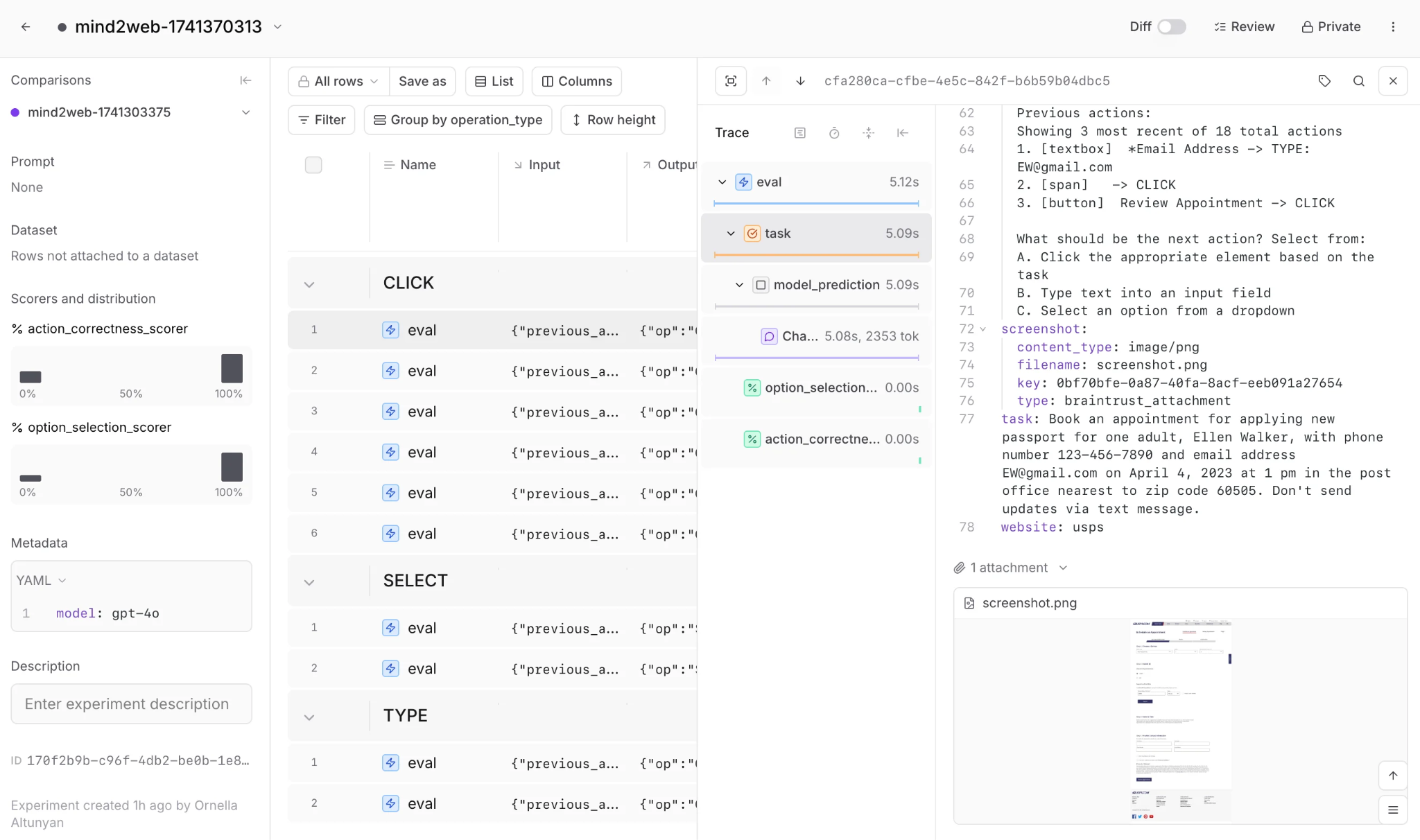
Each evaluation case records the task, the predicted action, and the screenshot the model saw, so a failed score can be inspected alongside its page evidence.
Braintrust connects production traces to the evaluations used to approve releases. When a browser run fails, reviewers can inspect its screenshots and page-state attachments, promote the failure from Logs into a dataset, rerun the case against a proposed prompt, model, or agent change, and compare the results with a baseline experiment.
Start with one browser task that represents a high-value user flow. Collect successful, partially completed, and failed runs, verify each result against the required end state, and add task-completion and step-level action scorers. Confirmed failures can then form the initial regression dataset, with extraction accuracy, loop detection, and trajectory scoring added when the collected runs expose those failure patterns.
Run the dataset as a Braintrust experiment
The web agent evaluation follows Braintrust's data, task, and scores structure. The task is the function that sends each formatted page state to your model and returns the predicted action, and the model it uses is recorded as metadata on the run:
# Run the evaluation
experiment_name = f"mind2web-{int(time.time())}"
Eval(
    "multimodal-mind2web-eval",  # Project name
    data=dataset,
    task=predict_action,
    scores=[option_selection_scorer, action_correctness_scorer],
    experiment_name=experiment_name,
    metadata={
        "model": MODEL,
    },
)
Each evaluation produces an immutable experiment that can be compared with a baseline at both the individual test-case and aggregate-score levels. Recording the model in metadata is what makes a later model swap comparable rather than confusing, since the two runs stay distinguishable in the experiment list. Site and action-type metadata help teams isolate a regression to a particular browser environment or interaction.
Set MODEL to a current multimodal model such as gpt-5-mini, and name the prediction function for what it does rather than for the model it calls, so swapping models does not require renaming your code. The web agent cookbook and the screenshot above come from the original 2025 run, which used GPT-4o, so the symbol names there differ from the model-neutral ones shown here.
Braintrust can also run evaluations on each pull request and apply defined pass-or-fail criteria before a merge. Online scoring continues evaluating production traces asynchronously, allowing newly identified failures to enter the next regression dataset.
The Braintrust free plan includes 1 GB of processed data and 10,000 scores per month, with unlimited users, projects, datasets, playgrounds, and experiments.
Start free with Braintrust and run the cookbook against your own web-agent traces.
Web agent evaluation FAQs (2026)
How do I evaluate my web agent?
Define an acceptance contract that specifies the starting state, permitted actions, required evidence, and any behavior that invalidates an otherwise successful result. Run representative tasks across multiple trials, inspect case-level regressions, and require the agreed score threshold before approving a change. Braintrust can group repeated trials by input, which exposes tasks where performance varies between runs.
How do I build evals for a web agent?
Build each case around a user goal and an independently verifiable result. Cover expected paths, alternative valid routes, known production failures, and situations where the agent should stop or request clarification. Define permitted side effects as well, since reaching the correct page after submitting a duplicate order or changing the wrong account should fail the evaluation. Braintrust recommends starting with a small representative dataset and expanding it with failures found in experiments and production.
What metrics should I track for browser agents?
Choose a primary release metric based on the task's user impact, then add diagnostic scores for the failures carrying the greatest risk. Transactional agents need strict checks for incorrect purchases, messages, or account changes, while extraction agents require field accuracy and source grounding. Track latency, cost, and step count separately so operational improvements do not conceal a decline in successful completion.
How do I catch hallucinated extractions in agent evals?
Require source evidence for every extracted field, such as the relevant DOM node, accessibility element, or screenshot region. Score the returned value and its association with the source separately because a number may appear on the page but belong to a different product, date, or record.
How do I test web agents when the site keeps changing?
Version each evaluation environment with its browser configuration and fixture or snapshot ID, then replay a failed live-site task against the last pinned version. A case that passes against the pinned version but fails on the live page points to website drift, while a failure in both environments after an agent change points to a likely regression. Review updated fixtures as new versions so previous experiment results remain reproducible.
What is the difference between web agent evals and general agent evals?
A general agent selects a developer-defined tool with a known schema, whereas a web agent must identify an action target from page state that can change between runs. General agent evaluation therefore emphasizes tool selection and argument correctness. Web agent evaluation carries those same checks and adds page interpretation, element grounding, state transitions, and website drift.